Editor Guide / Finishing & Sharing
Saving and Sharing Your Pattern
Saving is what turns a browser session into something you can come back to — on any device, whenever you're ready.
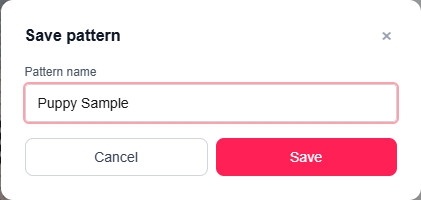
Saving
Click 💾 Save pattern and give it a name. This requires a free account — if you're not logged in yet, you'll be prompted to register first. Once saved, the button changes to a plain Save that silently updates the same pattern each time, and the page URL updates to include the pattern's link.
Reopening a saved pattern
File → Open… lists every pattern saved to your account, with a thumbnail and last-modified date, so you can pick up any of them again later — including Stitch Mode progress, hidden colors, and everything else exactly as you left it.
Ready to try it in the editor?
Open the editor →Frequently asked questions
- Do I need an account to save a pattern?
- Yes — saving (and downloading the PDF) requires a free account. Converting a photo and editing are free with no account.
- Can someone else open my pattern without signing up?
- Yes — a copied share link opens the pattern for anyone, no account required on their end.
- If I share a link, can the other person edit my original?
- They can open and edit it in their own session, but saving their changes creates a separate copy under their own account — your original isn't affected.
More in Finishing & Sharing
Other guides
Last updated 2026-07-30.