Editor Guide / Creating & Editing
Converting a Photo to a Cross-Stitch Pattern
Photo conversion turns any picture into a stitchable grid matched against real DMC thread numbers. Here is exactly what each setting does.
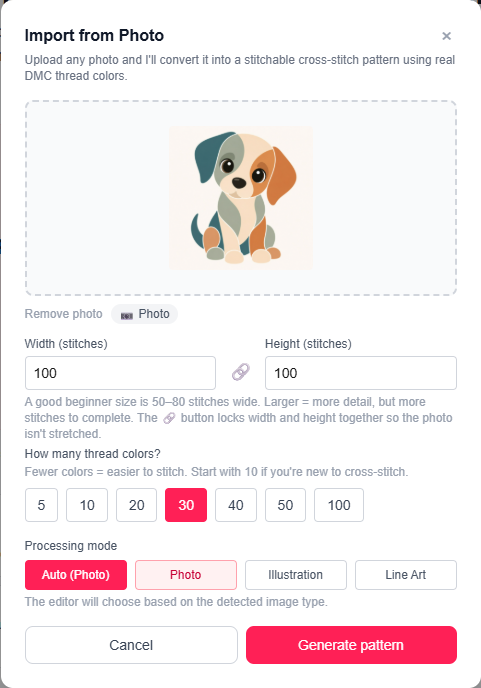
Uploading a photo
Open Import → From Photo… from the menu bar, then drag and drop your photo or click to browse. Supported formats are JPEG, PNG, and WebP, up to 5 MB.
Width and height
Set the pattern width and height in stitches independently — the default is 80×80. The photo is fit inside those dimensions while keeping its proportions; empty cells are added as padding where needed. Use the 🔗 lock button to keep width and height locked to the photo's aspect ratio so it isn't stretched.
Color count
Choose how many DMC thread colors to reduce the photo to: 5, 10, 20, 30, 40, 50, or 100. Fewer colors means a simpler, faster stitch; more colors preserves finer detail and gradients. There's no wrong answer — you can re-generate with a different count at any time.
Confetti cleanup
"Confetti" is the term for the stray, isolated single stitches that photo-to-pattern conversion tends to scatter across a design — a lone odd-colored cell surrounded by a completely different color, annoying to stitch because you have to jump the needle for just one stitch. Every pattern generated here runs an automatic confetti cleanup pass before you even see the result: any stitch with no same-color neighbor gets folded into the most common color around it.
This catches true one-cell confetti automatically, with nothing to click. If manual editing reintroduces any later — a stray pencil click, an undone fill — Chart → Remove Confetti runs the same cleanup again on demand, on the pattern as it currently stands.
Getting a cleaner result
A few things that consistently make the automatic conversion look better:
- Crop tightly to your subject before uploading if the background is busy.
- Good contrast between the subject and background converts more cleanly than a low-contrast photo.
- Don't chase photo-realism — cross-stitch has always been a translation, not a copy. A slightly stylized result usually stitches up better than a maximally detailed one.
Ready to try it in the editor?
Open the editor →Frequently asked questions
- What image formats are supported?
- JPEG, PNG, and WebP, up to 5 MB per file.
- Can I convert the same photo more than once with different settings?
- Yes — open Import → From Photo… again at any time and generate a fresh result without leaving the editor.
- Does the converter remove stray "confetti" stitches automatically?
- Yes — every generated pattern runs an automatic confetti cleanup pass before you see it, folding any isolated single stitch into the most common surrounding color, no extra click needed. If editing brings any back, Chart → Remove Confetti re-runs the same cleanup on demand.
- Is converting a photo free?
- Yes, with no account required. An account is only needed to save the pattern or download the PDF.
More in Creating & Editing
Other guides
Last updated 2026-07-30.